Eviction work is the most deadline-driven practice area most firms will ever run. A single property management client can send fifty delinquent tenants in one afternoon, and every one of those files carries its own notice period, cure window, filing deadline and hearing date. Miss one and the case goes back to the start, and the client notices.
Most landlord-tenant firms start the same way: a general practice management tool, a folder of notice templates, and a spreadsheet that one paralegal really understands. That works at twenty cases a month. At a hundred it starts to crack, and at five hundred it becomes the bottleneck for the whole firm.
This guide is for firm owners and practice managers deciding what comes next. It covers what eviction software actually needs to do at volume, how the main options on the market differ, and how to pick based on your caseload.
Disclosure: Case Compass makes Dwellex, one of the products compared here. We've tried to describe every option on its own terms, using each company's public descriptions, and to be clear about where a different tool may fit you better.
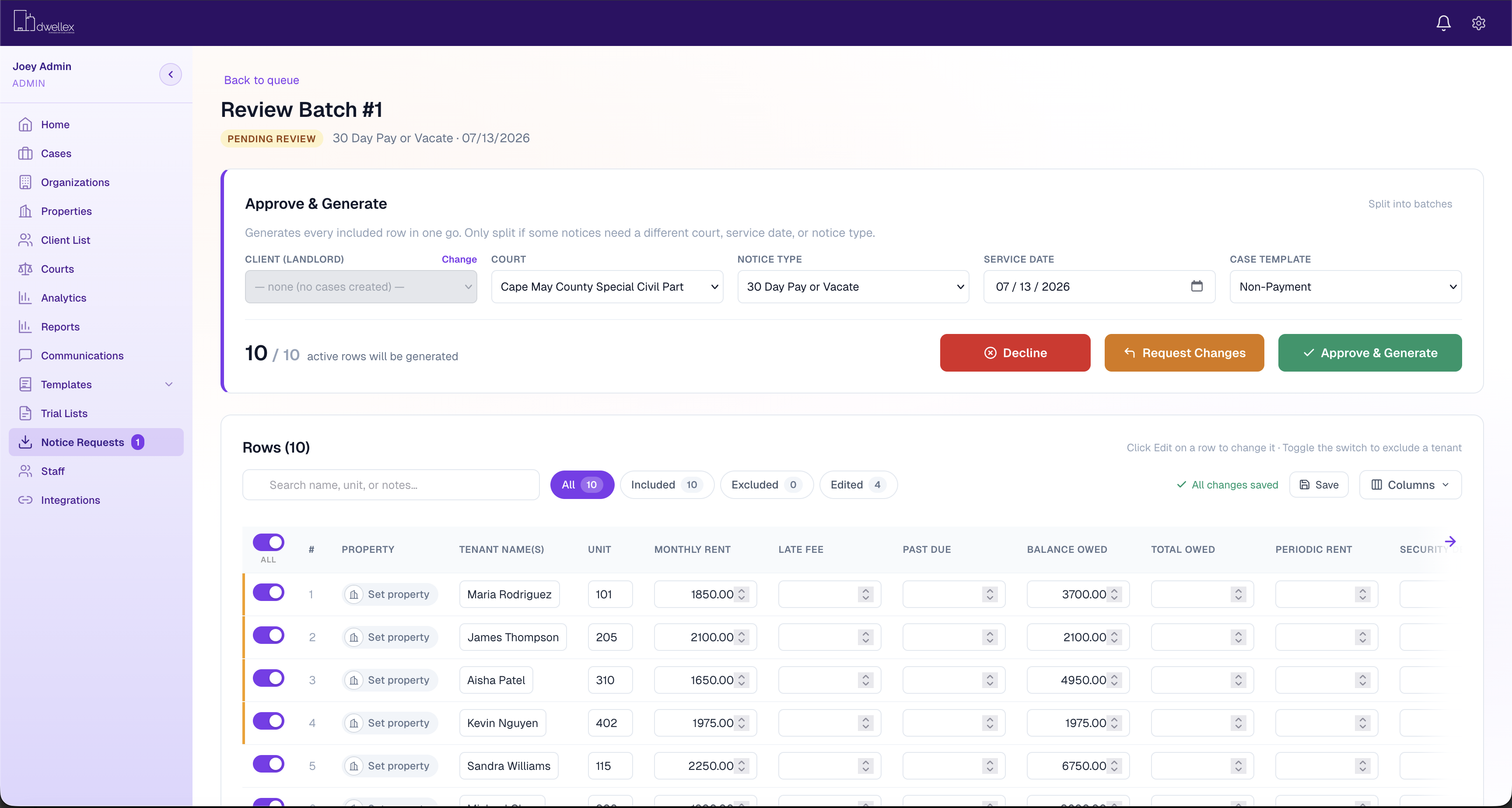
Batch notice review in Dwellex. Staff check intake details before notices are generated.
What eviction software needs to do for a law firm
A form filler helps a landlord produce one notice. A firm needs something different: a system that moves hundreds of matters through the same stages without anyone losing track. Seven capabilities separate the two.
1. Batch intake from property managers
Your clients already have the tenant data in their property management system. The software should accept a CSV export (or sync directly) and map the columns once, so staff review a batch instead of retyping ledgers. Ask whether it flags row-level problems, such as a missing unit number or a balance that doesn't add up, before anything is generated.
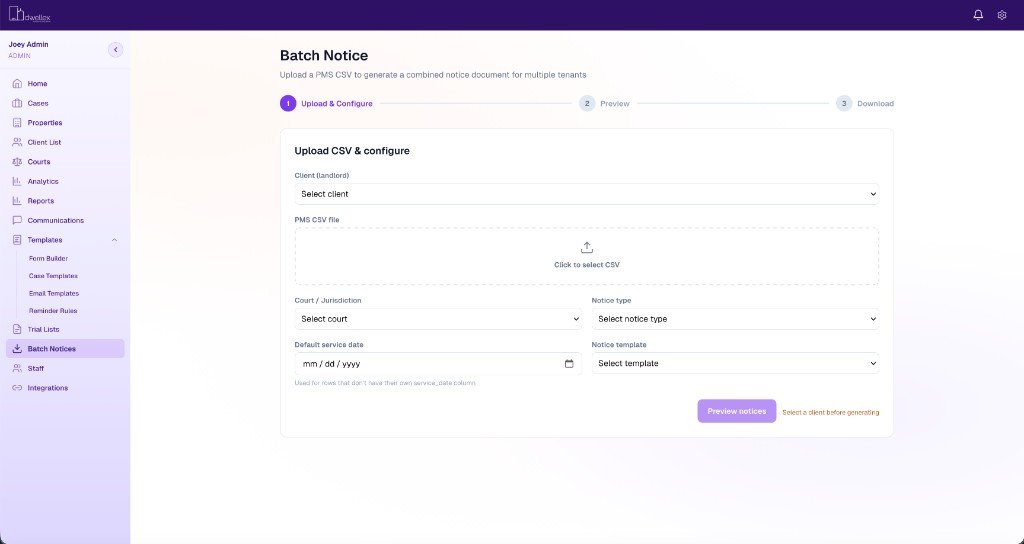
Notices generated from a property management export, reviewed before they go out.
2. Jurisdiction-aware notices
Pay or Quit and other notices vary by state and sometimes by county or city: notice periods, required language, service rules. Good software lets you configure those rules per court and applies them automatically, rather than relying on staff to pick the right template.
Court rules configured once, then applied when notices are generated.
3. Deadline tracking that runs itself
Cure periods, filing windows, hearing dates, vacate deadlines and lockout scheduling should calculate from the service date and trigger reminders without manual calendaring. This is where most spreadsheet workflows fail.
The part no other eviction platform has is the timeline you design. In Dwellex the timeline is the case. You draw it once for a matter type: who owns each step, which documents are required, what the property manager can see, and where the path splits when the facts change. A bad service does not sit in a note. The timeline asks how the case proceeds, then sends it to a revised quit date or back through service. Deadlines still calculate. The workflow runs with them. Nothing else on this list does that.
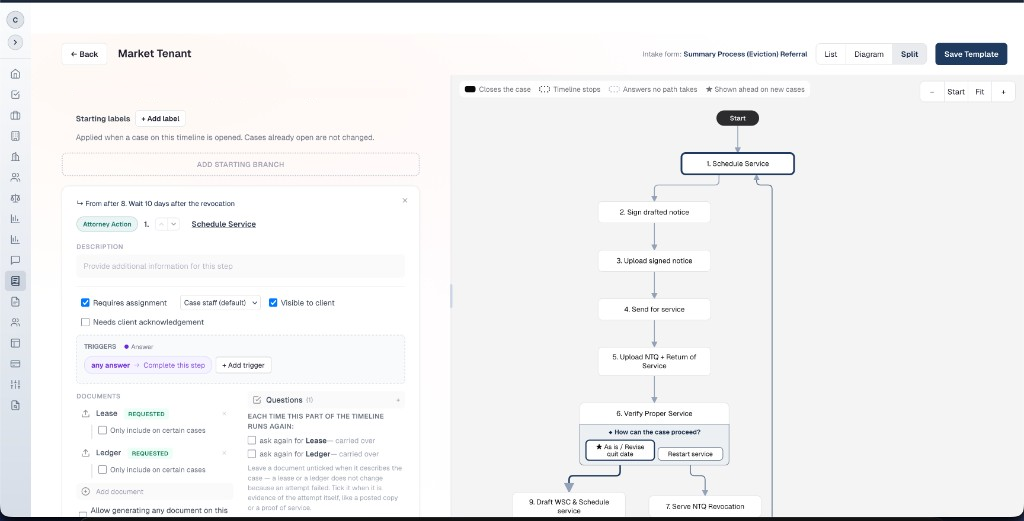
A Market Tenant timeline in Dwellex. Service, the notice, and the branch after a return of service.
4. A client portal
Property managers want to know where every case stands. A portal where they submit new matters, upload documents and see status cuts the "any update on Unit 4B?" emails that eat your paralegals' day. See what that looks like for a property manager.
5. Court-day tools
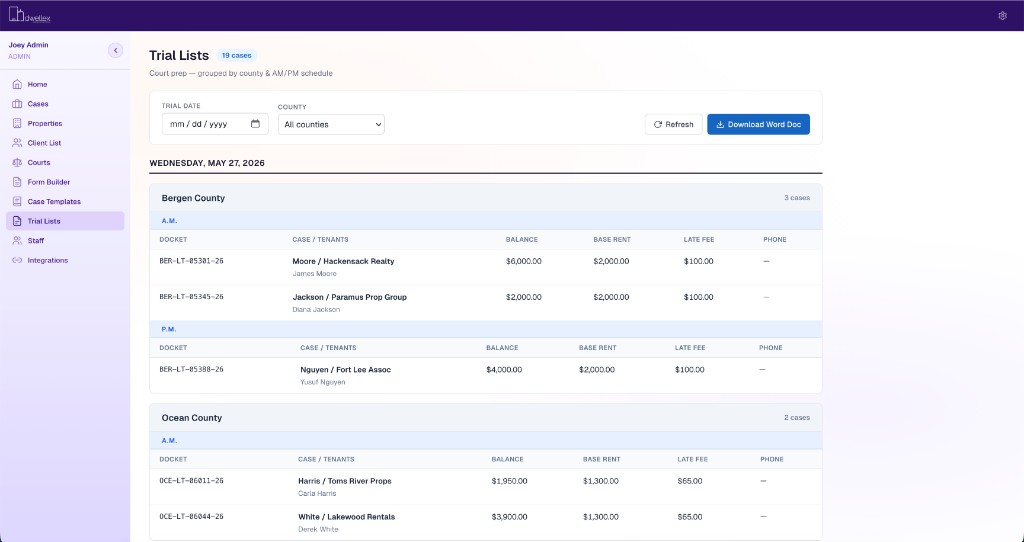
High-volume firms need trial lists and docket views that show every matter on a given calendar, with the file ready to go.
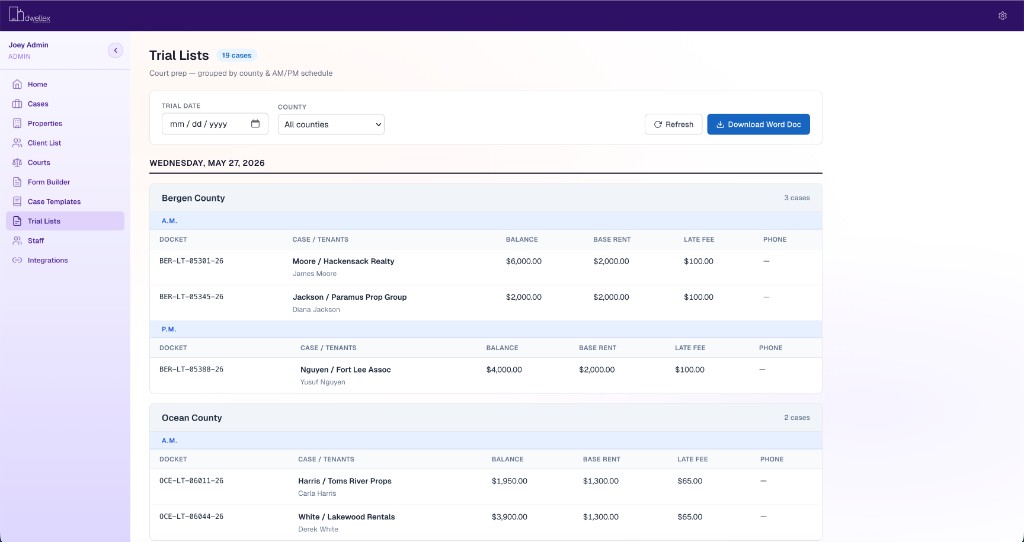
Trial lists grouped by county and session, ready for court day.
6. Integrations with the rest of the firm
If the firm runs on Clio or PracticePanther, eviction matters shouldn't live in a silo. On the client side, a direct connection to property management systems such as Rent Manager and Yardi removes a whole step. See Case Compass integrations.
7. Pricing that fits volume
Per-seat pricing punishes firms for adding paralegals, which is exactly how eviction practices scale. Look for pricing tied to caseload, and ask for it in writing before the demo.
The main options, compared
The market splits into three groups: eviction-specific platforms built for firms, tools built mainly for property teams, and general practice management software that firms adapt. Descriptions below come from each company's public materials as of September 2026; confirm details in a demo.
| Software | Built mainly for | Notable strengths | Published pricing |
|---|---|---|---|
| Dwellex | Landlord-tenant law firms and their PM clients | Visual case timelines you design, with branching steps, required documents, and a client-visible path. Batch notices from PMS CSV exports, configurable court rules, automated cure, hearing and vacate reminders, PM client portal, Clio sync, PracticePanther, Rent Manager and Yardi integrations | $399/mo + $8.00 to $5.00 per case, unlimited users |
| EasyEviction | Attorneys, eviction professionals, property managers | Case management, document automation, client portal, billing and invoicing, e-filing, SCRA and PACER checks, LawPay and QuickBooks | $89 to $139 per user/month (attorney plans) |
| EvictionAssistant | Bulk filers, attorneys, asset managers | Guided filing by jurisdiction, enterprise portfolio and attorney-performance reporting, process server access, Yardi and MRI connections | Not published |
| Throw Out My Tenant | Firms, PM companies, landlords | Submission-to-billing workflow, automatic form generation including mailing labels, automated client updates | Not published |
| EvictIQ | Property teams | Guided intake, case milestones, document organization, status reporting; service coordination in Georgia | Not published |
| Clio and similar | Law firms of every practice area | Mature matter, billing and document management; eviction steps built as custom workflows | Per user |
Where each one fits
- Dwellex is the one to pick when the matter itself has to be a timeline: branching steps, required documents, and a path the property manager can see, with pricing that doesn't grow with headcount. It's newer than some of the others, so ask for references in your state.
- EasyEviction is a strong choice for firms that want billing, invoicing and e-filing in the same tool. Per-user pricing is simple for small teams and adds up as staff grows.
- EvictionAssistant has a long track record with bulk filers and suits firms whose clients are large asset managers on Yardi or MRI.
- Throw Out My Tenant covers the full path from submission to invoice and suits firms that want one system for intake through billing.
- EvictIQ is oriented toward property teams managing their own cases, with attorney collaboration as one part of the workflow.
- Clio and other general tools make sense when evictions are a small share of the practice. Once eviction volume dominates, most firms find they're maintaining workarounds for batch notices and deadline math.
How to choose for your firm
Start with three numbers: cases opened per month, people who touch those cases (attorneys, paralegals, intake staff), and property management clients who send you work. They point you to the right category faster than any feature list.
| Your practice | What matters most | Where to start |
|---|---|---|
| Under 25 cases/month, evictions are a side practice | Keeping everything in one practice management system | Your existing PM software, with templates and a shared calendar |
| 25 to 150 cases/month, 2 to 8 staff | Batch notices, automated deadlines, a client portal | An eviction-specific platform; compare per-user vs. per-case cost at your headcount |
| 150+ cases/month, several PM clients | Bulk intake from PMS exports, court rules by jurisdiction, docket views, predictable cost as staff grows | A platform built for volume with caseload-based pricing |
| Your clients are large asset managers | Portfolio reporting to the client, Yardi/MRI connections | Ask each vendor for the exact PMS integrations your clients use |
Run the cost math both ways. Per-user pricing is users × monthly rate. Caseload pricing is platform fee + cases × per-case rate. Plug in your numbers today and your numbers in two years. Firms that expect to add paralegals faster than cases usually come out ahead on caseload pricing; small teams with steady volume may not.
Questions to ask in every demo
- Show me a 40-row CSV from one of my clients going from upload to reviewed notices.
- Where do I configure the notice period and required language for my county, and who maintains it when the law changes?
- What happens automatically when I enter a service date?
- What does my property manager client see when they log in?
- How does it sync with our practice management system, and in which direction?
- What will I pay at my current volume, and at double it?
Frequently asked questions
What is eviction case management software?
Software that runs landlord-tenant matters from intake through notice, filing, hearing and lockout, with deadlines calculated automatically and status shared with the landlord or property manager. It differs from a form filler, which produces documents but doesn't track the case.
Is general legal software like Clio enough for evictions?
For low volume, often yes. At higher volume, firms usually need batch notice generation, jurisdiction-specific court rules and a client portal that general tools don't provide out of the box. Many firms keep Clio for the rest of the practice and connect an eviction platform to it.
How much does eviction software cost?
Published prices in 2026 range from per-user plans (for example, $89 to $139 per user per month for EasyEviction's attorney plans) to caseload-based pricing (Dwellex is $399 per month plus $8.00 to $5.00 per case, with unlimited users). Several vendors quote on request.
Can property managers send evictions to their attorney electronically?
Yes. Most eviction platforms include a client portal where property managers submit tenant details and documents, and some accept CSV exports from property management systems so a whole batch arrives at once.
Does eviction software guarantee compliant notices?
No software replaces attorney judgment. The better tools apply the court rules your firm configures and flag problems before generation, but the firm remains responsible for what gets served.
See how Dwellex handles your caseload
If you're running evictions at volume and the spreadsheet is starting to win, walk through Dwellex with your own numbers. Bring a sample CSV from one of your property management clients and we'll show you the whole path from upload to court date.
See DwellexProperty manager? Here's what Dwellex looks like from your side, and how to get your attorney connected.