
Law firms that grow fast share two traits: they manage relationships intentionally and they move on high-quality leads first. Until now, those were two separate problems requiring separate tools, spreadsheets, or manual effort. Today, we're changing that.
We're launching two features that work hand-in-hand to make your intake process more systematic and your firm more competitive: Referrals and Waypoint.
The Referrals System: Your Partnership Hub
Referral relationships are one of the highest-ROI growth channels for law firms — but they're often managed informally, through email threads and mental notes. The Case Compass Referrals feature gives you a structured, transparent system for every partner relationship, from first lead to final fee.
Partner Management
Add referral partners with firm name, contact info, and default fee amounts. Activate or deactivate partners as relationships evolve.
Lead Tracking
Every referred lead is tagged to the source partner. See intake status, conversation progress, and case outcomes in one place.
Fee Management
Track fees as Pending or Paid with notes, amounts, and payment timestamps. Generate fee records with one click after intake completion.
Reporting
See total leads, intakes complete, conversion rates, and fee totals for every partner — at a glance and in aggregate.
Reporting: See the Full Picture
The Reporting tab in the Referrals section gives you a real-time dashboard of every partner relationship. At the top, summary metrics show total leads, intakes complete, fees paid, and fees pending across all partners. Below, a per-partner table breaks down conversion rates and fee status — making it easy to see which relationships are performing and which need attention.
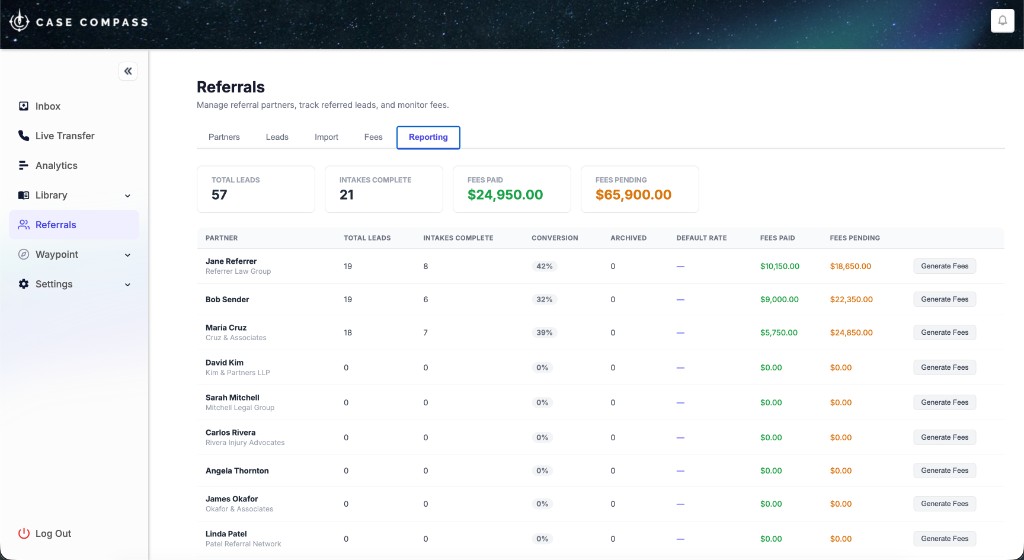
The Referrals Reporting tab — partner conversion rates, fee totals, and one-click fee generation.
Fee Tracking That Actually Works
The Fees tab gives your team a complete ledger of every referral fee obligation. Filter by partner, filter by status (Pending or Paid), and add manual fees when needed. Marking a fee as paid captures the timestamp automatically. For firms managing dozens of partner relationships, this removes the need for spreadsheets entirely.
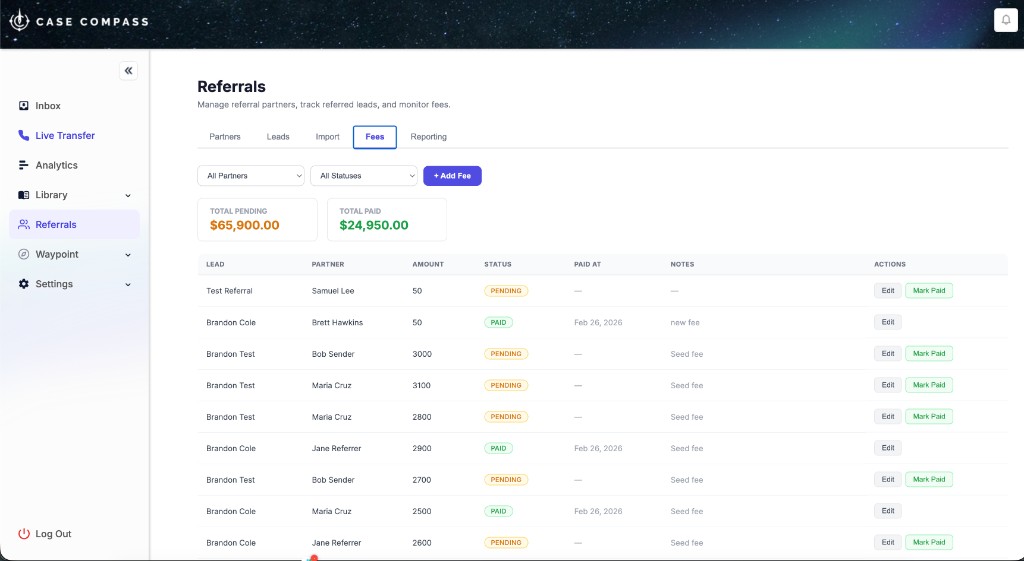
Fee tracking with per-lead detail, partner attribution, and one-click payment confirmation.
How fee generation works
When a referred lead completes their intake (conversation marked is_complete), you can click Generate Fees on the Reporting tab to auto-create a fee record for that partner at their default rate. Already-generated fees are skipped — no duplicates, ever.
The Referral Partner Portal
Partners get their own branded portal where they can submit new leads directly and track the status of every lead they've referred — no logins to your internal dashboard required. The portal shows real-time status including custom sub-statuses your team has assigned, so partners always know where things stand.
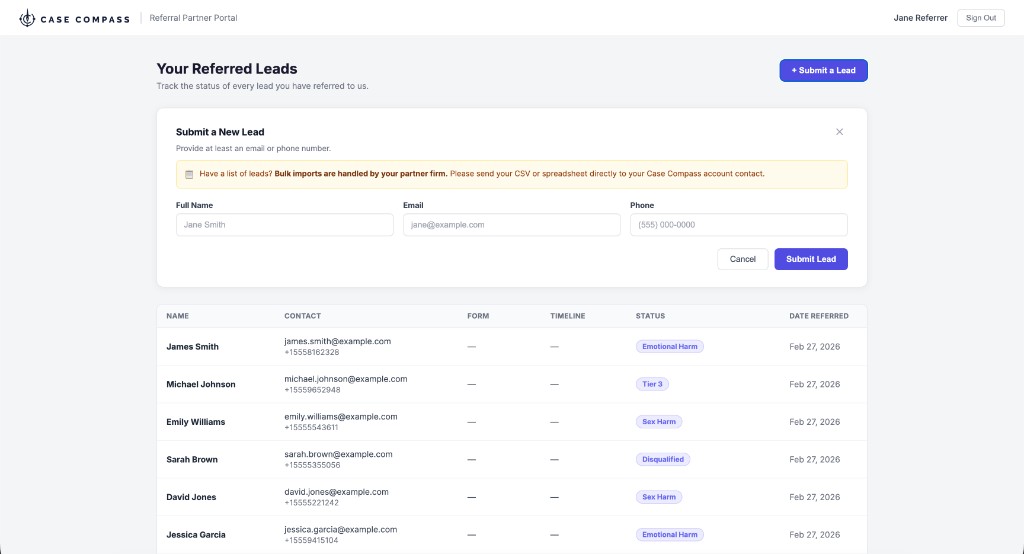
The partner-facing portal — leads submitted, statuses updated, fully transparent.
Getting Started with Referrals
- Navigate to Referrals → Partners in your dashboard and click + Add Partner.
- Enter the partner's name, firm, email, phone, and default fee amount. Set their status to Active.
- Share the portal login link with your partner — they can submit leads immediately.
- Your team will see referred leads in the Leads tab, tagged to the source partner.
- After intake completes, use Reporting → Generate Fees to create fee records automatically.
- Mark fees as paid in the Fees tab as payments are processed.
Waypoint: Intelligent Lead Scoring for Every Intake
Not every lead deserves equal attention. But without a systematic way to evaluate them, the loudest or most recent cases get the follow-up — not the strongest ones. Waypoint changes that.
Waypoint is Case Compass's AI-powered lead scoring system. The moment an intake is submitted, Waypoint automatically evaluates it and surfaces a score — so your team knows which cases to prioritize before they ever open the record.
Built Around Your Firm's Standards
Waypoint is configured around a library of criteria that reflect what your firm actually cares about — case value, liability, medical treatment, coverage, urgency, red flags, and more. The library is organized by category, tailored to your practice areas, and can target specific intake forms or apply across all intakes.
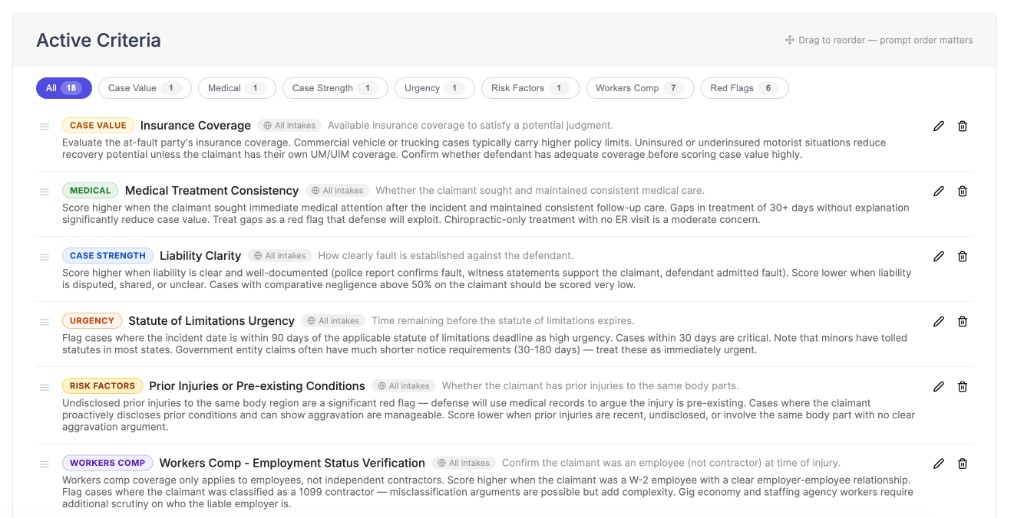
A fully built-out criteria library — organized by category and calibrated to your firm's evaluation standards.
What makes Waypoint different is that the evaluation logic is yours. Case Compass works with your team to configure criteria that encode your firm's expertise — not a generic scoring template. The result is consistent, documented evaluation on every intake, applied with the same standard every single time.
What Your Team Sees
Every scored lead shows up in the dashboard with a case score and a structured evaluation your team can act on. Intake staff can review Waypoint's assessment, apply their own judgment, and use scores to prioritize their queues. Scoring runs automatically on intake completion or can be triggered on demand.
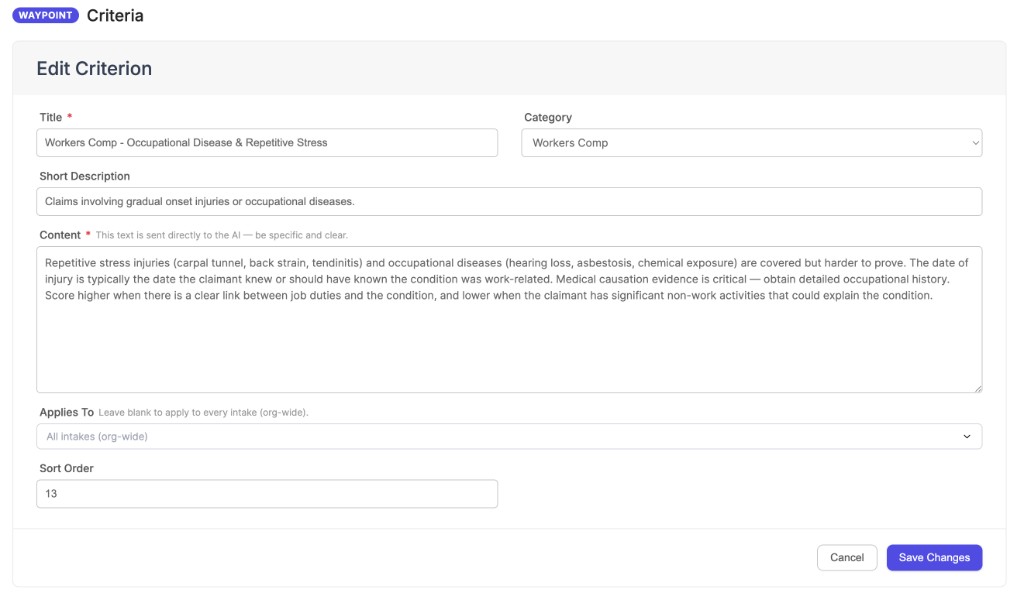
Each criterion is tailored to your practice — the depth of configuration is what makes the scoring genuinely useful.
Powered by AI
Waypoint uses state-of-the-art AI to evaluate every intake — delivering consistent, reasoned case assessments at a scale no manual review process can match.
AI Built Differently — With Privacy by Design
Most AI tools in legal tech share a common problem: your data flows through a vendor's infrastructure, gets pooled with other customers' data, and may be used to train or improve the underlying models. For law firms handling sensitive client information, that's an unacceptable trade-off.
Case Compass approaches AI differently. Waypoint is built on a Bring Your Own Key (BYOK) model. That means AI requests are made using your firm's own API credentials — not a shared Case Compass key — so your intake data flows directly between your account and the AI provider, never through a Case Compass data pool.
What BYOK Means for Your Firm
No data pooling
Your intake data is never combined with data from other Case Compass customers. Every request is isolated to your account.
Zero training on your data
Your credentials are governed by your direct agreement with the AI provider. Case Compass never touches that data for training or model improvement.
Full transparency
You can see exactly what data is sent for evaluation, audit usage directly with the AI provider, and revoke access at any time.
Your competitive edge stays yours
The criteria your firm builds in Waypoint represent hard-won institutional knowledge. BYOK ensures that expertise isn't inadvertently shared or exposed.
This is a fundamentally different approach from most AI-powered SaaS tools, and it's an intentional one. Law firms have ethical and regulatory obligations around client data. We built Waypoint so that using AI doesn't create new compliance surface area for your firm.
BYOK: Privacy by Architecture
With Case Compass's Bring Your Own Key model, your data never passes through a shared AI infrastructure. No pooling, no training, no exposure — just the intelligence your firm needs, on your terms.
Why These Features Belong Together
Referrals and Waypoint solve different problems, but they reinforce each other in practice. When a referral partner submits a lead through their portal, Waypoint can score it automatically before your team even opens the record. Your intake staff sees a case score alongside the lead's information — so follow-up is prioritized, not arbitrary.
For firms with high lead volume, this combination does something powerful: it makes consistency possible at scale. Every referred lead is tracked. Every intake is evaluated. No cases fall through the cracks because someone was on vacation or the queue got too long.
And for referral partners, the portal gives them something they almost never get from law firms: real transparency. They can see their leads, see their statuses, and trust that the relationship is being managed professionally. That trust compounds over time into more referrals and stronger partnerships.
Frequently Asked Questions
What is the Case Compass Referrals feature?
What is Waypoint?
Is Waypoint configured for my firm's practice areas?
Can referral partners see their leads' statuses?
How are referral fees tracked?
How do I get Waypoint set up for my firm?
Does Case Compass use my firm's data to train AI models?
What is BYOK and why does it matter for law firms?